
Applies to IRIS Manager | Guest Room | Guest Mobile | Guest Web | Mobile Dining When an item runs out, staff mark it as unavailable in Simphony. This is commonly known as 86ing an item. By default, IRIS isn’t told about this, so guests can still order the item online. When they place the order, they get a warning that the item isn’t available.
To automatically mark these items as Out of Stock in IRIS, the Item Out-Of-Stock feature needs to be enabled. Once it’s on, IRIS checks Simphony regularly for any change in an item’s status (every 120 sec by default) and marks unavailable items as Out of Stock in IRIS Manager and Guest Web.
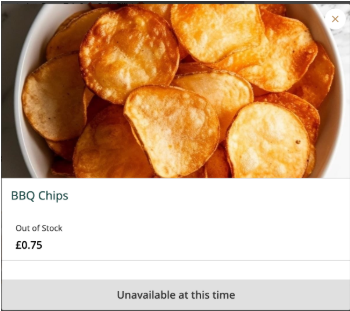
TABLE OF CONTENTS
- Before you start
- Turning on Out-of-Stock in IRIS Manager
- Testing it with an item in Simphony
- Frequently asked questions
- Related articles
Before you start
- The property must use Simphony TS Gen 2. This feature isn’t available for TS Gen 1
- The TS2 POS integration must already be set up and syncing
- Know which menu(s) the property wants to track out-of-stock items for
Turning on Out-of-Stock in IRIS Manager
1. In IRIS Manager, go to Setup > Webhook Subscriptions
2. Add a new subscription
3. Check POS Integration shows Simphony TS2 (POS TS 2 Integration)
4. Under Supported Events, tick Item Out-Of-Stock
5. In Menus, select the menu(s) to check for out-of-stock items
6. Leave Out-of-Stock Poll interval (seconds) at 120 unless the property needs something different
7. Click Save
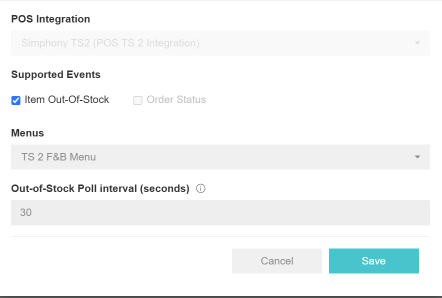
The Order Status event on the same page is a separate feature and isn’t needed for out-of-stock items.
Testing it with an item in Simphony
Once the subscription is saved, test it with a real item so you can check the service is working.
1. On a Simphony workstation, tap Func
2. Look for a function button typically called MI Availability (often found in the 'Manager' menu)
3. Choose an item, make it unavailable, then tap Done to save
4. Wait for the poll interval (around 120 seconds)
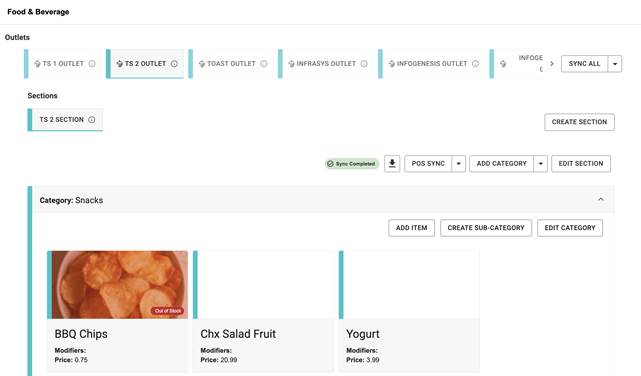
5. In IRIS Manager, open the Items or Filtered Items page. The item should show a red Out of Stock badge next to its name
Remember to make the test item available again in MI Availability when you’ve finished, so it doesn’t stay off sale for guests.
Frequently asked questions
Why doesn’t the item show as out of stock straight away?
IRIS checks Simphony at the poll interval, so there can be a short delay (30 seconds by default) before the badge appears.
The badge isn’t appearing. What should I check?
Make sure the subscription was saved, Item Out-Of-Stock is ticked, the right menu is selected and the item is on that menu. Also check the item you made unavailable in Simphony has the same POS ID (#) as the POS ID in IRIS, as this is how the two are matched. Wait for the poll interval and refresh the page. If it still doesn’t appear, raise a ticket with IRIS Support with the property, item name and the time you made the change.
What happens when the item is made available again?
On the next check, IRIS removes the Out of Stock badge and the item can be ordered again.
Related articles
- Troubleshooting Simphony Items Not Coming Through on a Sync
- Configuring Items (Simphony TS_2): https://support.iris.net/en/support/solutions/articles/24000106411-configuring-items-simphony-ts-2-