
Applies to IRIS Manager | Guest Room | Guest Mobile | Guest Web | Mobile Dining Overview
If a guest needs a refund for an order, the refund must be processed through your payment provider, not through IRIS. This guide shows you how to use the Order Centre to find the payment details for an order, so you can locate and refund the correct payment in your payment provider's portal.
TABLE OF CONTENTS
- Overview
- Why can't refunds be issued in IRIS?
- How to find the Payment Reference Number in the Order Centre?
- How to issue the refund with your payment provider?
- Frequently asked questions
- Related articles
Why can't refunds be issued in IRIS?
IRIS does not take, hold or process guest payments. When a guest pays for an order, the payment goes directly to your property's payment provider. This means refunds can't be issued from the Order Centre or by IRIS Support and must be processed by your property in the payment provider's portal.
IRIS works with the following payment providers:
- Freedom Pay
- Stripe
- Adyen
- Shift4
Note: You'll need a login to your payment provider's portal to issue a refund. If you don't have one, please speak to your finance team or the person who manages your property's payment account.
How to find the Payment Reference Number in the Order Centre?
- Login to IRIS Manager https://gxp.iris.net
- Navigate to Guest Centres > Order Centre
- Find the order you would like to refund in the list of orders
- Click on the order to open and view the order details
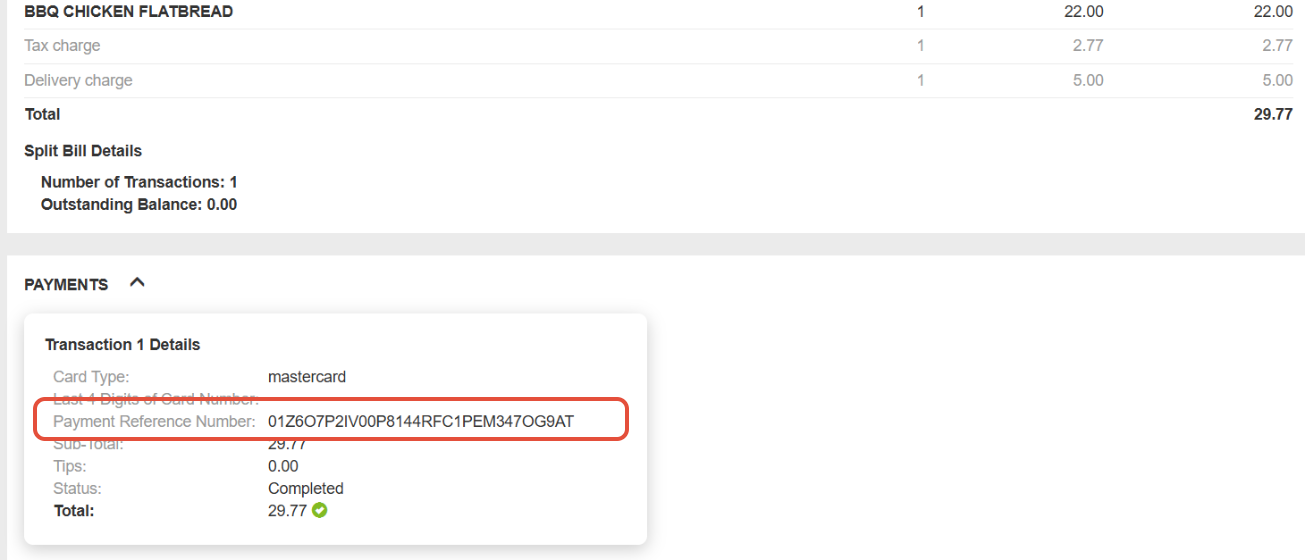
- Locate the Payment Reference Number and make a note of it, or copy it
- Make a note of the order total, date and time. These will help you confirm you've found the correct payment in the next step
Info: If you can't see the outlet or its orders in the Order Centre, you may need to be added to the outlet first. See Adding Users to the Order Centre.
How to issue the refund with your payment provider?
- Login to your payment provider's portal (Freedom Pay, Stripe, Adyen or Shift4)
- Search for the payment using the Payment Reference Number from the Order Centre
- Check the amount, date and time match the order in the Order Centre
- Open the payment and select the refund option. Most providers let you refund either the full amount or part of it
- Confirm the refund
Tip: The steps and menu names are different for each payment provider. If you can't find the refund option, check your provider's help pages or contact their support team.
Frequently asked questions
Can IRIS Support process the refund for me?No. IRIS does not have access to your payment account or your guests' funds. Only your payment provider can return money to the guest.
I can't find the payment in my payment portal. What should I do?Check that the Payment Reference Number has been copied exactly, with no extra spaces. You can also try searching by the order amount and date. If you still can't find the payment, please contact your payment provider.
How long will it take for the guest to receive their refund?This depends on your payment provider and the guest's bank. Your payment provider will be able to tell you their usual timescales.